Craft CMS 6: the Laravel rebuild, and what it means for your website

Craft CMS 6 is being rebuilt on Laravel, with release expected at the end of 2026 or early 2027. What's exciting, what the upgrade involves, and how to prepare.
Back in September 2020 I wrote a post called Craft CMS + Laravel: a match made in heaven?. At the time it was pure speculation, prompted by a few hints Brandon Kelly had dropped in the Craft CMS Discord about one day moving Craft off the Yii Framework. I got fairly carried away. I mentioned the Carlton dance.
Six years later the question mark can come off. Craft CMS 6 is being rebuilt on Laravel, it was announced at Dot All 2025, the first alpha landed in May 2026, and a steady run of alphas has followed. This post is my attempt to answer the three questions I keep being asked about it:
- What is there to actually get excited about?
- What will the upgrade path look like, for website owners and for plugin authors?
- What can be done now to be ready?
Where things stand today
As of early October 2026:
May 2026: first public alpha. The port itself is done: the entire codebase now runs on Laravel rather than Yii 2. That took Pixel & Tonic roughly a year.
May to October 2026: nineteen alphas. They came weekly or faster through June and July, then slowed to fortnightly in August and monthly since, as the bigger feature work started landing. The latest, alpha.19 on 1 October, brought approval workflows, comments and a sizeable chunk of the new control panel.
Next: beta, which will be feature complete.
End of 2026 or Q1 2027: general availability of Craft 6. Pixel & Tonic’s transition planning article gives this window, describing roughly six months of alpha followed by a three-month beta.
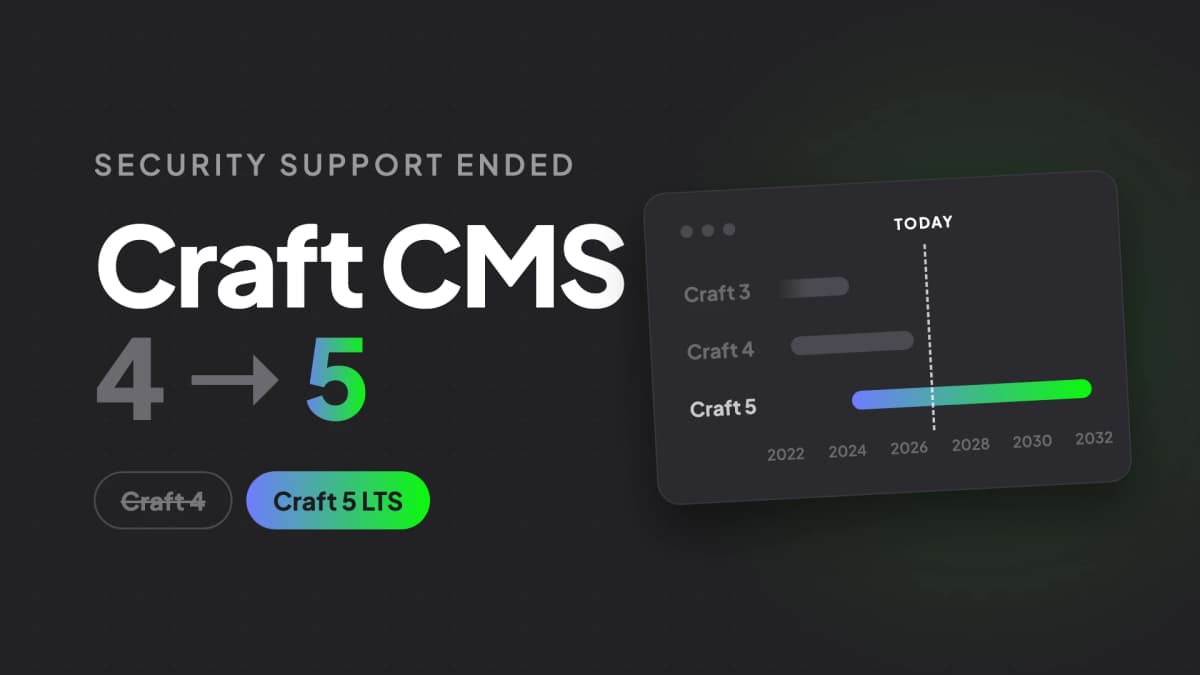
Through to roughly 2031: Craft 5 long-term support. Craft 5 becomes a long-term support release, with five years of maintenance after Craft 6 ships. This matters more than any other date in this post, and I’ll come back to it.
The alpha is genuinely an alpha. The control panel is still mid-rebuild, and the changelog is full of the sort of entries you’d expect at this stage, breaking changes for plugins included. It is not something to point at a client site. But it is complete enough to read, run and form a view on, which is more than could be said for the equivalent point in the Craft 2 to Craft 3 cycle.
What there is to get excited about
It’s a port, not a rewrite
This is the single most important design decision, and it’s a direct lesson from Craft 3. Pixel & Tonic have been unusually candid that the Craft 3 rewrite “took several years too long” and asked developers to rewrite their plugins in exchange for very little that content editors could actually see.
Craft 6 is deliberately the opposite: mostly a strict port. Elements, entry types, fields, Matrix, sections, project config, element queries, services, plugins, Twig — the concepts you know are all still the concepts. Yii’s components have been swapped out underneath for their Laravel equivalents: yii\db\ActiveRecord for Eloquent, Yii’s DI container for illuminate/container, its router, event system, cache and queue for Laravel’s. Everything the Craft team could avoid refactoring, they avoided refactoring.
For anyone who has spent years building Craft sites, that means your existing knowledge carries over almost entirely. That was never true of the Craft 3 transition.
Craft becomes a Laravel package
Craft 6 is distributed as a Laravel package, which means it can be dropped into an existing Laravel application. This is the part I find most interesting commercially.
We build a lot of bespoke Laravel applications and a lot of Craft CMS websites, and there’s a recurring pattern where a client needs both: a proper marketing site with real editorial flexibility, alongside a members’ area, portal or piece of custom business software. Today that’s typically two applications, two deployments, two sets of auth, and a certain amount of glue. In Craft 6 it can be one application, where the custom features live in Laravel and the content lives in Craft, sharing the same container, the same users, and the same deploy pipeline.
That’s a materially better answer for a whole category of project we get asked about regularly.
Blade templates, alongside Twig
Twig isn’t going anywhere — it’s still the default, and still the sandboxed option for anything user-authored. But Craft 6 can also render Laravel Blade templates through the same page lifecycle, with Craft-specific directives for the things Craft needs to do.
<!doctype html><html>    <head>        <title>{{ $entry->title }}</title>        @craftHead    </head>    <body>        @craftBeginBody
        @craftCache('entry-'.$entry->id, duration: '+1 hour')            <h1>{{ $entry->title }}</h1>        @endCraftCache
        @craftEndBody    </body></html>
There’s a full set of these: @craftCss, @craftJs, @craftHook, @craftNamespace, @craftPaginate, @craftRequirePermission, @craftRedirect. Twig can render Blade views via a blade() function and Blade can @include() Twig views, so the two can coexist in one project rather than forcing a choice.
I don’t expect us to abandon Twig — we’re very comfortable in it, and for content-managed front ends it remains an excellent fit. But being able to reach for Blade in a project that’s half Laravel application is a real convenience.
craft.app gives way to facades
In Craft 5, reaching for a service in a template means craft.app.entries and friends. In Craft 6, craft.app is deprecated in favour of Laravel-style facades, and Craft registers a long list of them — Entries, Elements, Fields, Sections, Sites, Assets, Users, ProjectConfig, Drafts, Revisions, and plenty more.
use CraftCms\Cms\Support\Facades\Sections;use CraftCms\Cms\Support\Facades\Sites;
$section = Sections::getSectionByHandle('news');$site = Sites::getPrimarySite();
Small change on paper, but it’s the sort of thing that makes a codebase feel native to the framework it’s built on rather than bolted onto it.
Element queries are Laravel query builders
This one I only spotted by reading the source. ElementQuery now implements Illuminate\Contracts\Database\Query\Builder. Element queries remain the way you fetch content — you don’t use Eloquent models for elements — but they now satisfy Laravel’s query builder contract, which means the surrounding Laravel ecosystem understands them.
Laravel’s plumbing, for free
A lot of what Craft has historically had to build and maintain itself now comes from the framework:
Queues. Craft’s jobs are now standard Laravel queued jobs, which means Redis, SQS, database or any other Laravel queue driver, plus the whole Laravel tooling ecosystem around them. For sites that push a lot of work through the queue — big resaves, image transforms, search indexing — this is a significant operational upgrade.
Authorisation. Element permissions now run through Laravel’s Gate and policy system, so Gate::allows('save', $entry) works the way any Laravel developer would expect.
Mail, logging, filesystems, caching, rate limiting, sessions, hashing. All Laravel’s, all configured the Laravel way. Some plugins that exist purely to bridge these gaps in Craft 5 simply won’t be needed.
OAuth logins. Craft 6 ships a Socialite-based OAuth login system for the control panel, configured in GeneralConfig::oauthProviders(). “Sign in with Google” for editors becomes composer require laravel/socialite and a config array, rather than a plugin. It’s a Pro and Enterprise feature.
Tinker. Craft’s exec command has been removed in favour of Laravel’s Tinker REPL.
Testing. The core is tested with Pest 5, formatted with Pint, analysed with PHPStan/Larastan and refactored with Rector. If you already run that toolchain on your Laravel projects, it’s the same toolchain now.
A new control panel
The control panel is being rebuilt as an Inertia/Vue application, with a component library (@craftcms/ui) built on web components rather than the jQuery-based Garnish layer that has served Craft since 2013. The legacy jQuery surfaces still exist and are being migrated page by page — you can watch it happen in the changelog — with dark mode, proper mobile support and WCAG 2.2 conformance all in scope.
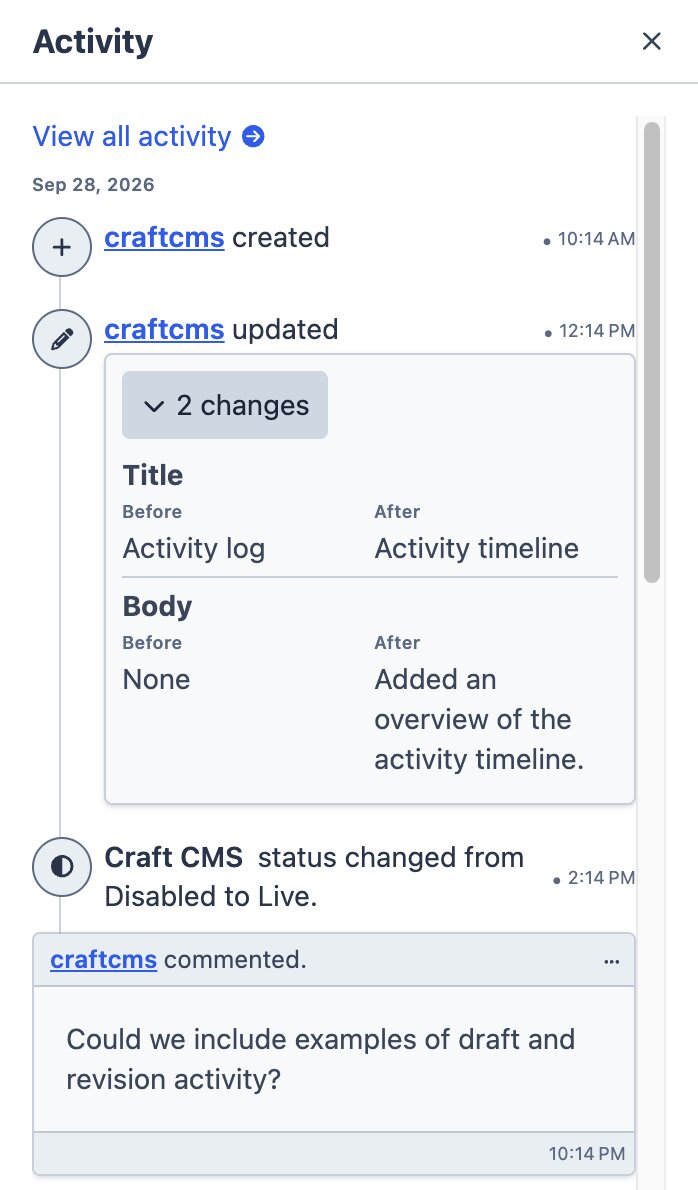
It has come on a long way since the summer. alpha.19 added inline editing and exports to element index tables, search that updates as you type, flyout menus in the main navigation, a tidier page layout that works better on mobile, and one consistent system for success and error messages. Here’s a glimpse from a local build of the latest development code:
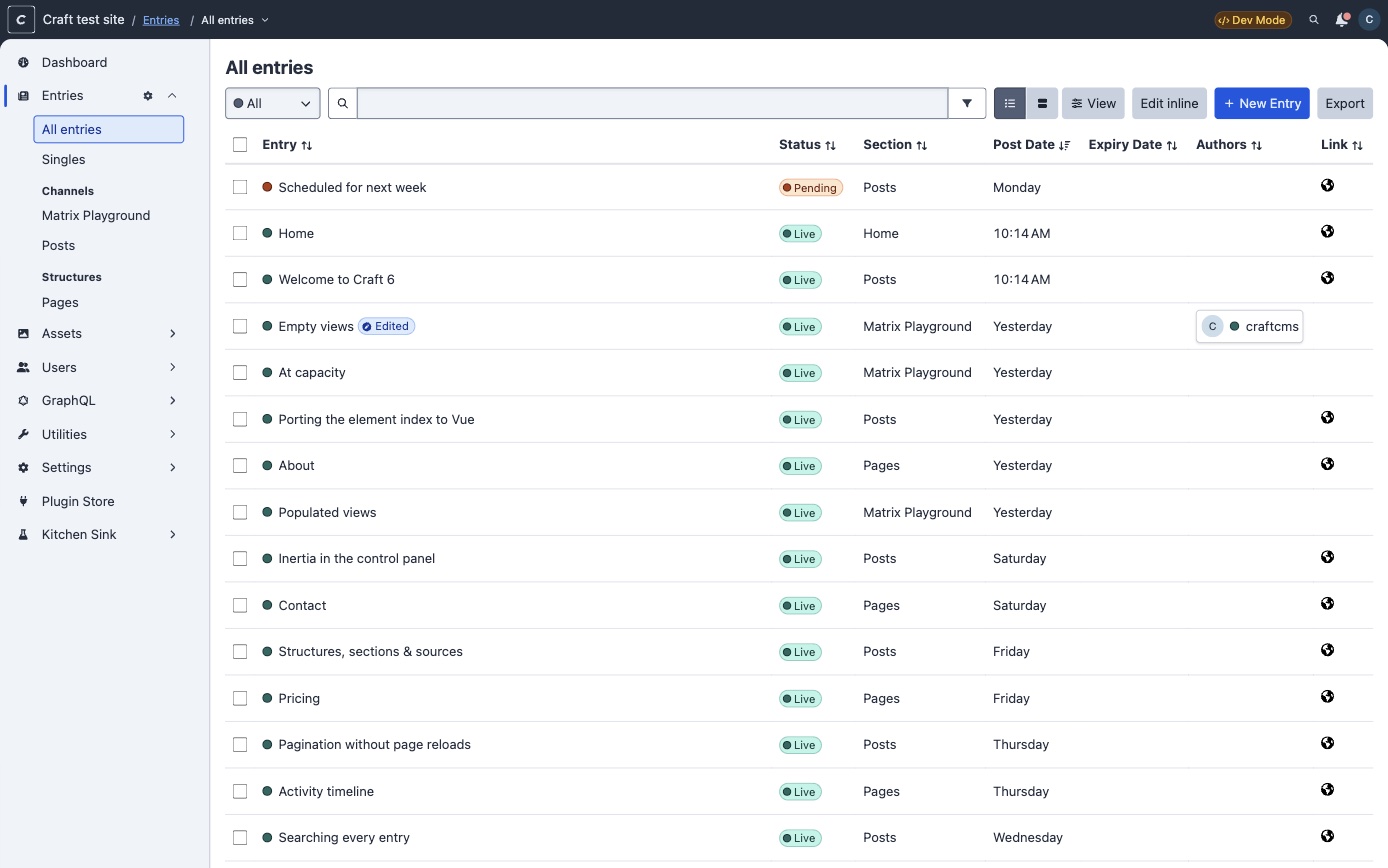
The entries index, now with inline editing, exports and search as you type
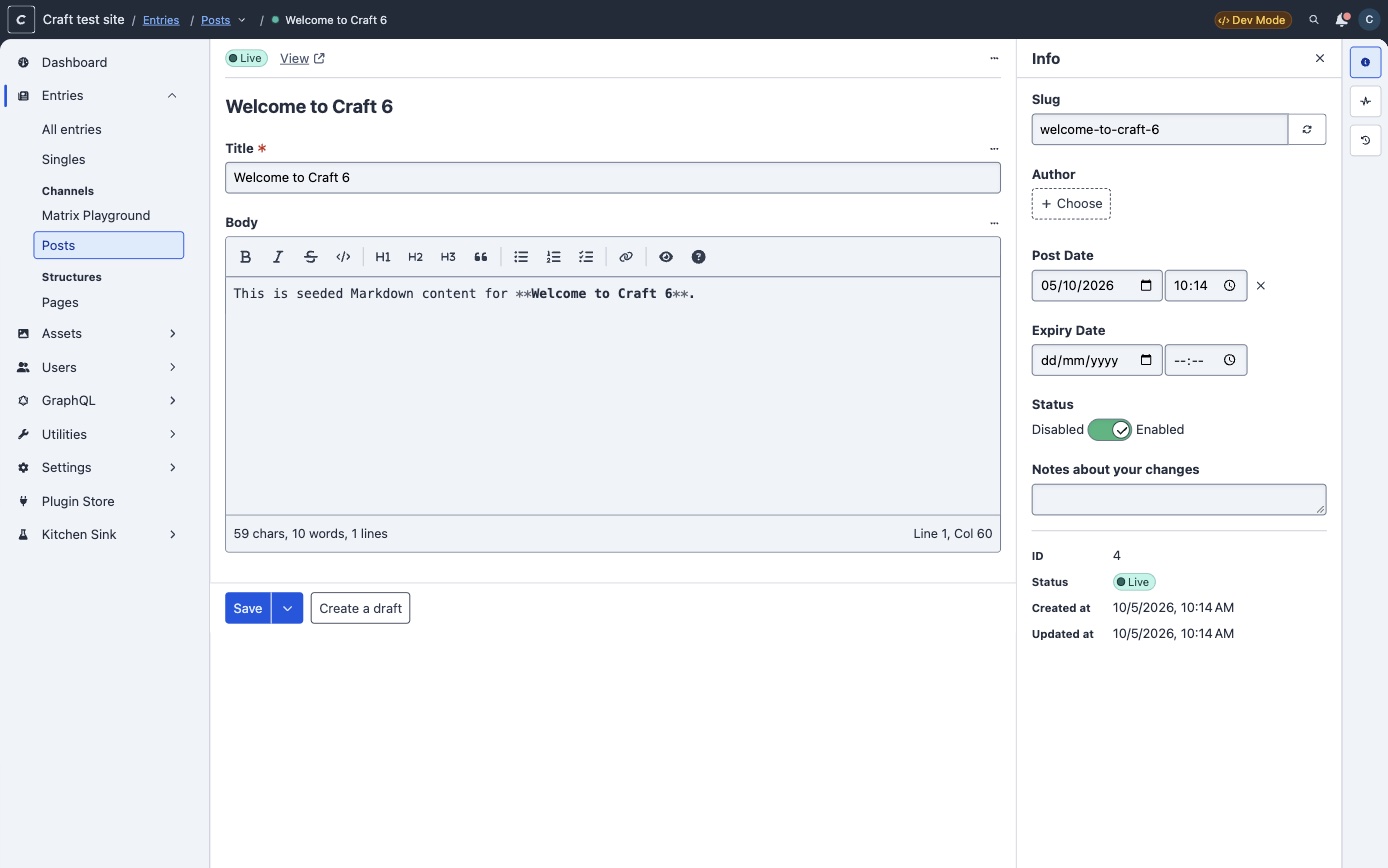
The entry editor, with details in a panel down the side
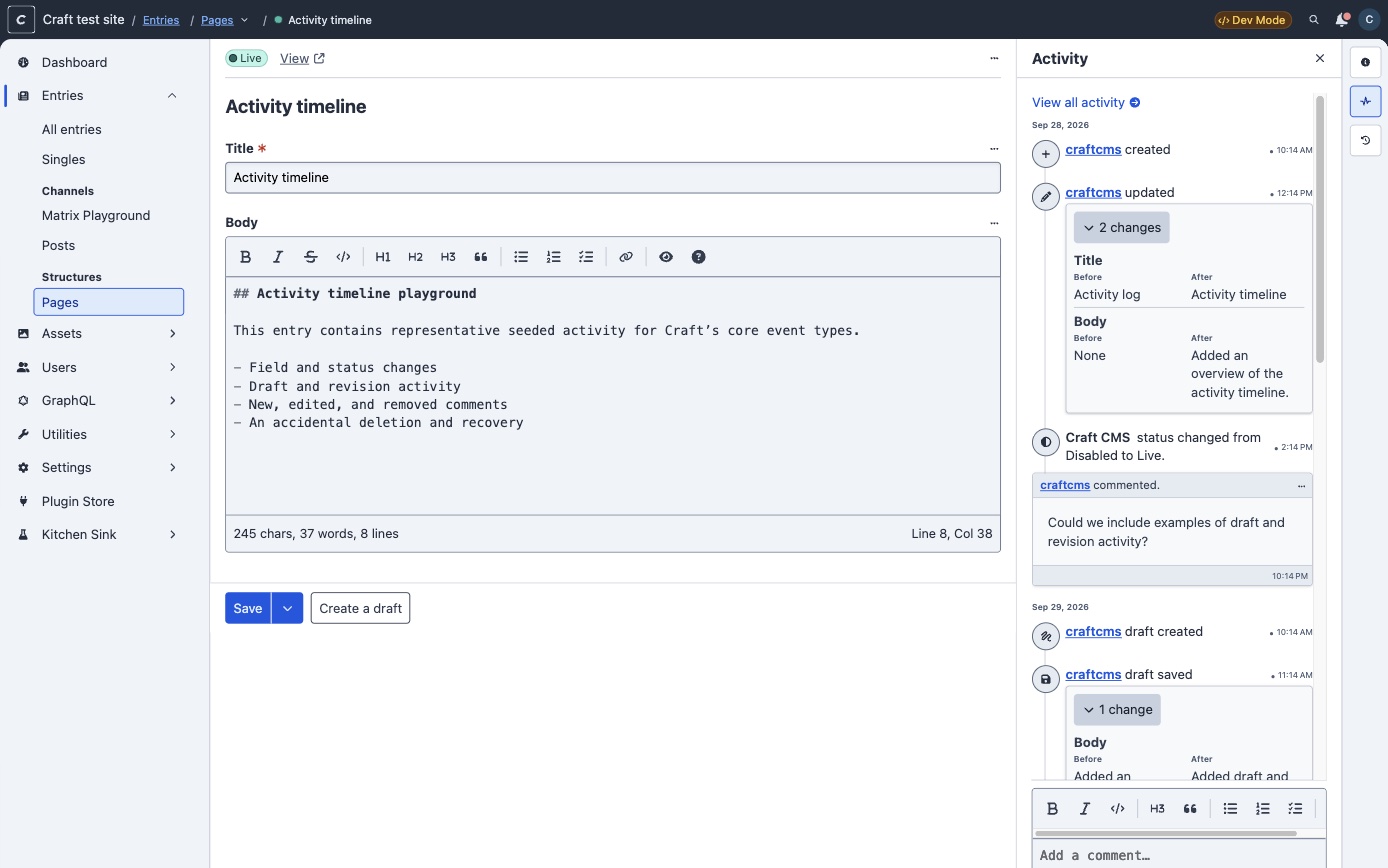
Activity timelines record who changed what, and editors can comment on them
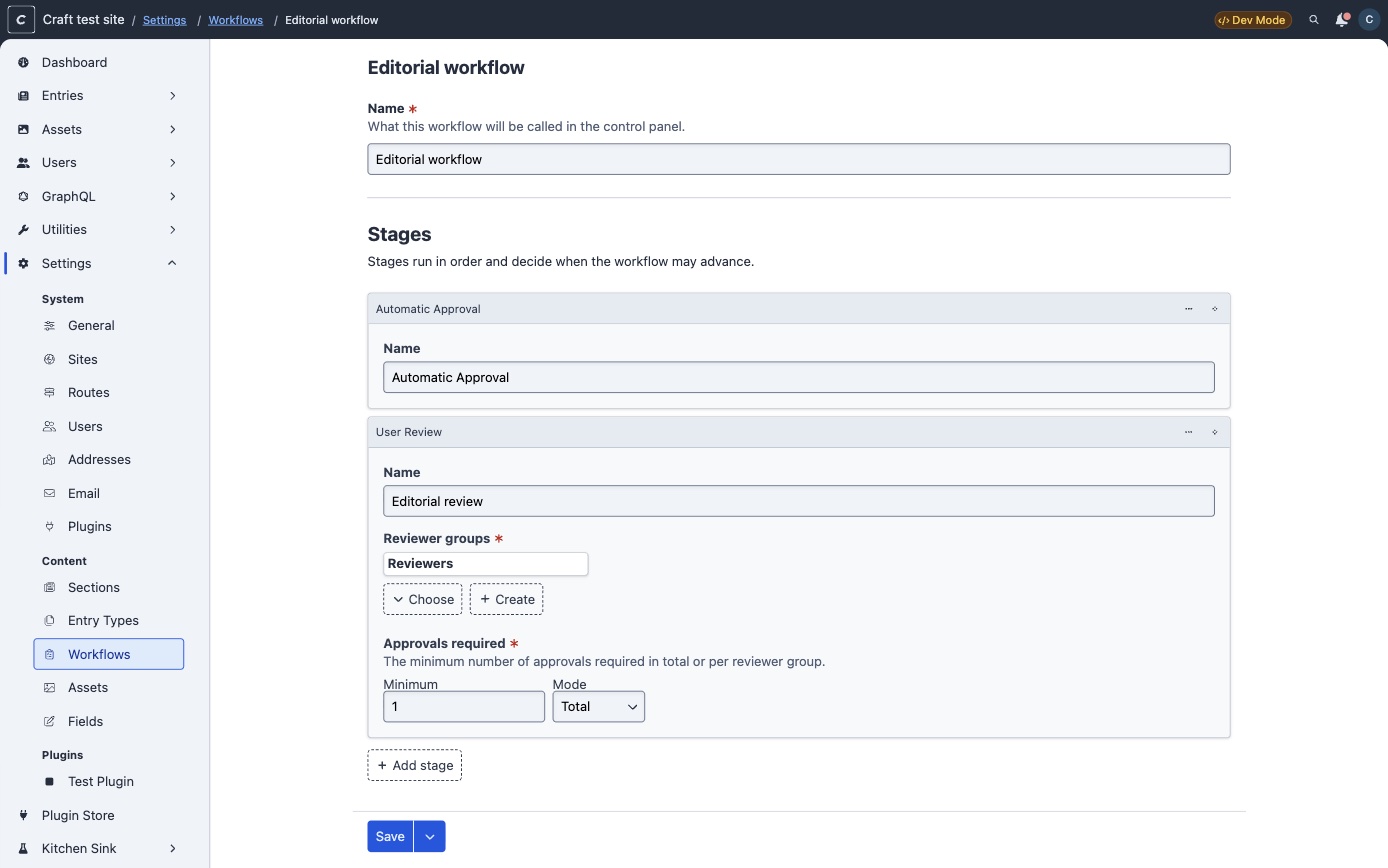
Approval workflows are set up in Settings and assigned to sections
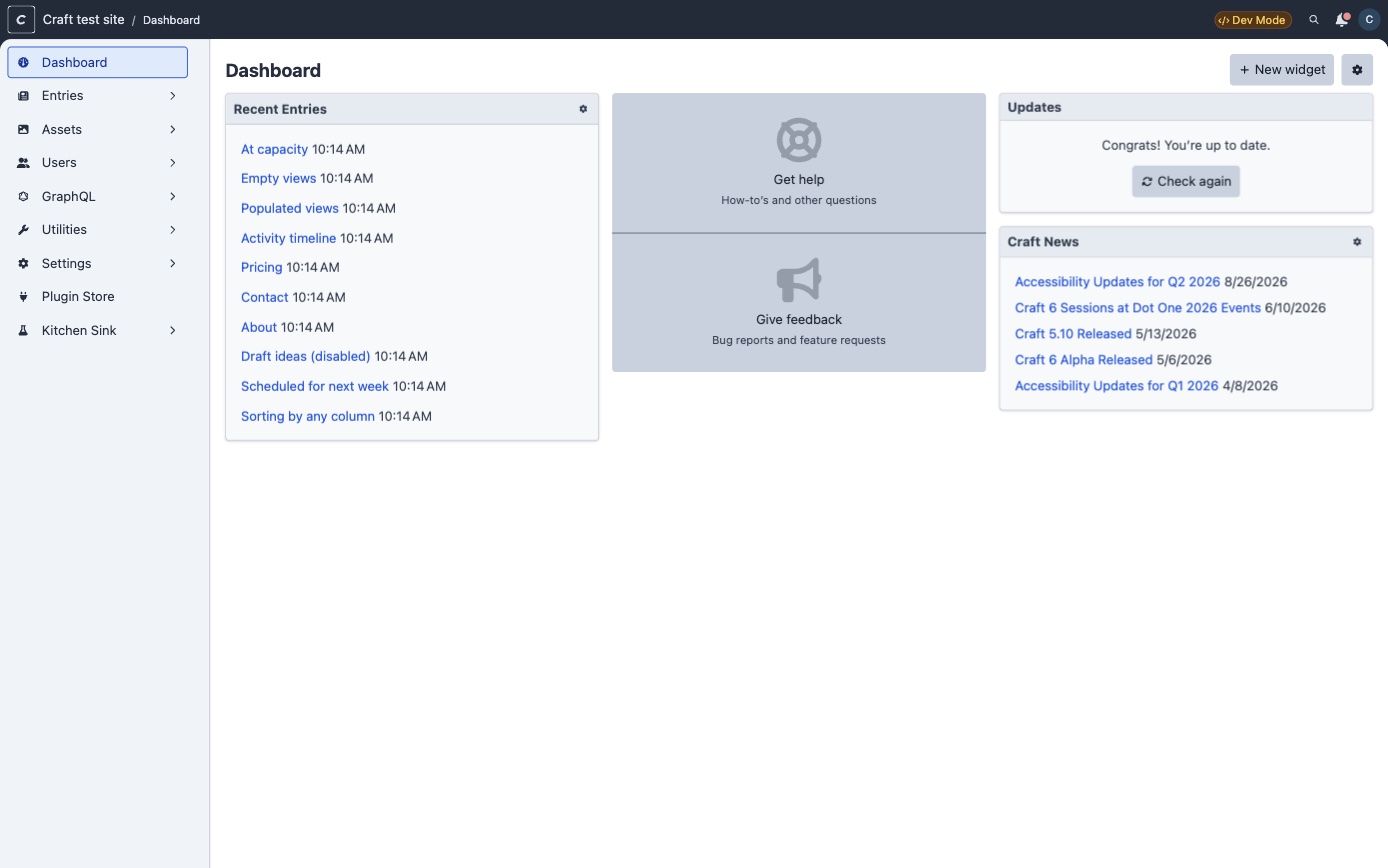
The dashboard, which is one of the more familiar screens
Treat these as a snapshot of work in progress rather than a preview of the finished product. The control panel is still very much being built, and the styling in particular may well change before release. It’s also the part of Craft 6 your editors will actually notice, so it’s well worth keeping an eye on as it takes shape.
Features for the people who use the CMS every day
The other lesson from Craft 3 was that a framework migration nobody outside the dev team can see is a hard sell. So Craft 6 also brings a set of author-facing features:
- Content releases — publishing a batch of entries and drafts together, or on a schedule, rather than one at a time
- Scheduled drafts — a future publish date on a specific draft
- Approval workflows — proper review-and-approve before anything goes live
- Commenting and activity logs — conversation and an audit trail attached to the content itself
- An import tool in core
For any client with a content team of more than about three people, content releases and approval workflows are worth more than every technical change in this post combined.
Two of these have now landed, in alpha.19. Approval workflows are set up under Settings → Content → Workflows and assigned to sections; once a section has one, changes to a live entry are saved as a draft that has to pass each review stage before it goes live. Reviewer groups, minimum approvals, change requests and email notifications are all there. Workflows are a Pro and Enterprise feature. Comments now appear on each element’s activity timeline, with Markdown, @mentions and email notifications. Content releases, scheduled drafts and the import tool haven’t appeared in the codebase yet, so expect those through the beta or after.
 Full size
What the upgrade will be like
If you own a website
The most important thing I can tell you is: there’s no rush, and there’s no cliff. Craft 5 is a long-term support release with maintenance running roughly five years past Craft 6’s launch. A Craft 5 site launching this autumn has a supported life into the early 2030s. Nobody has to move in 2026, and I’d gently suggest that almost nobody should.
What your editors will see: not much, initially. The control panel is being redesigned, so there’s a UI change to get used to, but the content model, the fields, the entries, the workflow and the front end of your website all carry over. Your visitors will see nothing at all. This is a change of foundations, not of the house.
What it will cost: this is a proper upgrade project, not a patch release. Honestly budgeted, the work breaks down as:
- A plugin audit. Every third-party plugin needs a Craft 6-compatible version, and any that have quietly gone unmaintained need replacing or rebuilding. In our experience this is where the real cost and the real risk sits, and it varies enormously between sites. A site with four well-maintained plugins is a very different proposition to one with twenty-two, three of which were abandoned in 2023.
- A PHP upgrade. Craft 6 requires PHP 8.5. More on this below, because it’s the thing most likely to catch people out.
- A project restructure. Craft 6 projects are Laravel applications, with a different directory layout and different config conventions. There’s a first-party tool that does most of this mechanically, but it still needs review and testing.
- Retesting. Forms, integrations, payment flows, feeds, search, redirects, anything custom. The usual.
My honest advice on timing: don’t be first and don’t be last. Let the beta shake out, let the plugin ecosystem catch up, and plan the work for some point in 2027 — sooner if you were already due a redesign, in which case combining the two is far better value than doing them separately. If you’d like a view on where your own site sits, that’s essentially what our website review service is for.
If you’re a developer
The mechanics are more concrete than I expected at this stage. Pixel & Tonic have published a Craft 6 upgrade guide and, better still, an upgrade tool — craftcms/craft6-revamp — that restructures a Craft 5 project into a Craft 6 one for you. It’s installed globally with Composer and run from the project root:
composer global require craftcms/craft6-revamp -Wcraft6-revampIt checks you’re on a supported Craft 5 release, then updates Composer dependencies (adding craftcms/yii2-adapter), switches DDEV to the laravel project type, renames environment variables, moves Craft’s config into config/craft/, renames the web root to public/ and translations/ to lang/, and creates the artisan entrypoint and Laravel’s bootstrap/ files. It asks before doing anything destructive and finishes with a list of manual follow-ups. It’s meant for a development copy only: commit first, and never run it on a live server.
The changes that stood out to me reading through it:
- Your project becomes a Laravel application.
bootstrap.phpgoes away, templates move toresources/views/, and the layout follows Laravel conventions. - Database config moves to Laravel’s conventions.
config/db.phpis replaced by standardDB_*environment variables instead ofCRAFT_DB_*. - Some config settings relocate —
timezonetoconfig/app.php, mail settings toconfig/mail.php, session and hashing to their respective Laravel config files. craft.appis deprecated in templates in favour of the facades, and a handful of Twig filters go with it, includingfilterByValue,purifyanducfirst.- HTMLPurifier is out, replaced by Symfony’s HtmlSanitizer, so
|purifybecomes|sanitize. - Markdown moves to CommonMark, exposed through a
Markdownfacade. - Filesystems become Laravel disks. As of
alpha.19, Craft no longer manages filesystems itself. Volumes and image transforms point at disks defined inconfig/filesystems.php, and existing filesystems are migrated to matching disks, with an error telling you what to do if a disk isn’t configured. - Image handling moves to Intervention Image, with an optional libvips driver. Images also get BlurHash placeholders out of the box, via
asset.blurhash. execis gone, in favour of Tinker.
Prerequisites worth knowing before you start: be on the latest Craft 5 with all plugins current, be on PHP 8.5, have all deprecation warnings cleared, have flattened any multi-environment config files to environment variables, have drained the queue (jobs are lost in the upgrade), and ideally have entrified categories, tags and global sets.
One pleasant surprise in the requirements: alongside MySQL 8.0.17+, MariaDB 10.4.6+ and PostgreSQL 13+, Craft 6 adds experimental SQLite support. Not something I’d put in production, but for local development and small internal tools it’s an interesting option. Worth noting too that MariaDB is now explicitly not recommended for high-traffic sites.
If you write plugins
This is where the Craft 3 comparison really breaks down, in a good way. There’s a first-party compatibility layer, craftcms/yii2-adapter, which translates Yii 2 API calls to their Laravel equivalents at runtime. For most plugins, Craft 6 compatibility is:
composer require craftcms/yii2-adapterThat, plus updating a couple of low-level method signatures if you happen to implement attributes() or attributeLabels(). That’s the mandatory list. Most plugins will run without a line of application code changing.
The catch is versioning. Unlike the move from Craft 4 to 5, a single release can’t support both (^5.0.0|^6.0.0 isn’t possible). To show as “Craft 6.0-ready” in the control panel, a plugin needs a new major version (an alpha or beta tag is fine) that requires craftcms/cms ^6.0.0 and adopts the new plugin base class.
Three caveats from the documentation and the changelog that are worth flagging:
Test without the adapter present. The upgrade tool installs it automatically, and it’ll be active if any Composer-installed plugin requires it — so it’s easy to convince yourself your plugin works standalone when it doesn’t. Strip the adapter and every other plugin out of a test project and require it explicitly from your own package.
The adapter is a runway, not a destination. It’s supported throughout Craft 6’s lifecycle, but it exists to let you migrate on your own schedule. Don’t remove it until you’ve cleared the deprecation warnings it surfaces.
It’s still an alpha, and the extension API is still moving. alpha.14 removed the automatic plugin trait lifecycle hooks and stopped plugins defining extra.laravel.providers in composer.json. alpha.15 then replaced around 25 “resolving” events with explicit registry APIs — ElementTypes::register(), FieldTypes::register(), UtilityTypes::register() and their siblings. alpha.19 opens with a breaking-changes warning for plugins: settings move to createSettings() and settingsForm(), there’s a new Form API, and plugins can no longer register their own filesystem types. If you maintain plugins, following the changelog through the beta will save you rework.
What you can do now
Nothing here is wasted effort even if you never upgrade — it’s all just good housekeeping — but each item shortens the eventual project.
Get to the latest Craft 5. Non-negotiable, and the prerequisite for everything else. If you’re on Craft 4 or earlier, that’s the actual priority; Craft 6 is a conversation for after.
Sort out PHP 8.5. This is the one I’d start on today. Craft 6 requires PHP 8.5, which only landed in November 2025. A lot of hosting is still sitting on 8.2 or 8.3, and some managed platforms will take a while to offer 8.5 at all. Find out what your host supports and when, because if the answer is unsatisfactory, that’s a hosting migration hiding inside your CMS upgrade — and much better discovered now than in the middle of the project. It’s also worth checking the extension list while you’re there: Craft 6 wants BCMath, ctype, cURL, DOM, Fileinfo, GD, iconv, Intl, JSON, mbstring, OpenSSL, PCRE, PDO, Reflection, SPL and Zip, with ImageMagick recommended over GD.
Clear your deprecation warnings. Craft’s Deprecation Warnings utility is the single best-value hour you can spend right now. Every warning you clear on Craft 5 is one you don’t debug on Craft 6.
Audit your plugins, ruthlessly. For each one: is it actively maintained, when was it last released, and is it something Craft 6 or Laravel now handles natively? Plugins that exist to provide mail transports, logging, filesystems or queue drivers are prime candidates for deletion rather than migration. Every plugin you remove now is one less dependency to wait on later.
Flatten multi-environment config to environment variables. Required by the upgrade anyway, and better practice regardless.
Entrify categories, tags and global sets. Craft has been nudging people this way since 4.4, and Craft 5 stopped you creating new ones. Craft 6 deprecates them: upgraded sites keep working through the compatibility layer, under a new “Deprecated” heading in Settings, but they’re clearly on borrowed time. Far better to convert them deliberately on Craft 5, where you can test it in isolation, than to have it forced on you later inside a larger migration.
Budget for it. If you have a Craft 5 site with a meaningful plugin footprint, put a line in your 2027 planning. Not urgent, but not free either, and it’s a much easier conversation to have twelve months early.
If you’d rather someone else kept an eye on all of this, that’s more or less the job description for our Craft CMS support and maintenance work.
Our take
We’ve been Craft developers since version 1 in 2013 and official Craft Partners since 2018, and we’ve built on Laravel for about as long. We’ve spent years running two mental models in parallel: Craft’s and Laravel’s. Craft 6 collapses that into one, and it’s difficult to overstate how much easier that makes the day job — shared tooling, shared testing approaches, shared deployment patterns, and developers who feel equally at home whichever kind of project they’re dropped into.
Is it going to be entirely painless? Of course not. A change of this magnitude never is, the control panel rebuild is a big undertaking on its own, and the plugin ecosystem will take time to catch up. But the shape of this transition is fundamentally healthier than Craft 3’s was: a port rather than a rewrite, a compatibility layer that does real work, a five-year LTS window on Craft 5 so nobody is forced to move before they’re ready, and features that content teams will actually notice.
Six years ago I ended that post with “Let’s do this, Craftisans”. It took a while, but here we are, and it looks like it was worth the wait.
Further reading: Craft 6, built on Laravel is the official landing page (with a mailing list for alpha, beta and stable announcements); Craft’s Going Laravel is the original announcement; Planning for the Laravel Transition has the current timeline; the Craft 6 upgrade guide, the craft6-revamp upgrade tool and Craft 6 requirements are the developer detail; and Viget’s Craft 6 and Laravel: what you need to know is a good developer-oriented summary.